One system to run the whole portfolio.
From the turnover in progress to the owner waiting on a payout, STVRms keeps every moving part of a vacation rental operation in one place. Here's what's shipping in early access.
See the entire portfolio at a glance
A live operations board showing every property's real status: occupied, vacant, in maintenance or in turnover. Stop reconstructing the day from texts and a whiteboard.
- Real-time status across every property
- Filter by location, type, or availability
- Turnovers scheduled from every checkout
Dashboard
+ New Task| Property | Type | Location | Status |
|---|---|---|---|
| SF-12 | 3BR Beach House | Oceanside | Occupied |
| SF-04 | 2BR Downtown Condo | Downtown | Checked in |
| SF-19 | Mountain Cabin | Big Bear | In shop |
| SF-26 | 1BR Garden Apartment | North Park | Occupied |
| SF-07 | 3BR Beach House | Downtown | Turnover |
Owner payouts, done right and done for you
Payouts calculate from the nightly rate after processing, split by each property's individual share. Options and taxes stay itemized and are never charged back to owners — so every owner statement is clear and correct.
- Per-property revenue share settings
- Automatic monthly owner statements
- Clean separation of rate, processing, options and tax
Calculated from the nightly rate after processing, split by the property's share. Options and taxes itemized separately, never charged back.
Routing that respects your rules
Every checkout creates the turnover job automatically. Assign cleaners and vendors, attach the checklist, flag supplies and get photos back before the next check-in.
- Eligibility rules enforced on every booking
- Cleaner and vendor assignments
- Photo reports and supply flags
Maintenance, repairs and claims in one place
Every property's service life tracked end to end — from a flagged inspection item to a closed work order, with insurance claims and the staff who did the work all on the same record.
- Maintenance tracking with service history per property
- Repairs logged against the property and the booking
- Insurance claims with status, value and source
- Work orders created from flagged inspection items
- Internal staff assignment and accountability
Service & Repair
+ Add New Claim| Maintenance Type | Property | Status |
|---|---|---|
| HVAC service | Property 36 | Scheduled |
| Water heater | Property 51 | Open |
| Brake controller | Property 31 | In progress |
| Turnaround clean | Property 17 | Complete |
| Tire rotation | Property 08 | Complete |
Catch issues before the guest does
Custom turnover and inspection checklists from any phone or tablet, with photos and notes. A failed item converts to a work order in one tap so the property is ready sooner.
- Fully customizable checklist forms
- Photos and comments on any item
- Failed item → work order in one tap
Smart review surfaces what matters
STVRms flags the cost outliers and property anomalies worth a closer look, and shows the history behind each flag — so approvals come with context instead of guesswork.
- Repair-cost outlier detection
- Per-property history and trends
- Context attached to every flag
Repair cost on the Harbor Condo is running well above its trailing 12-month average and lines up with a recent system failure. Confirm parts and labor before approving.
Every department in one system
Rentals, Property Department, Service & Repair, Customers, Owners, an all-in-one calendar, accounting and inspections — one operational source of truth, organized the way a vacation rental portfolio runs. Here's the problem each one solves.
Rentals
+ Add Reservation| Ref | Guest | Property | Status |
|---|---|---|---|
| HF-44821 | xxxxxx xxxx | SF-51 · Fuse | Staying |
| HF-44862 | xxxxx xxxxx | SF-70 · Solitude | Confirmed |
| HF-44907 | xxxxxx xxxxxx | SF-08 · Whitehawk | Requested |
| HF-44930 | xxxxxx xxxxx | SF-17 · Momentum | Confirmed |
| HF-44788 | xxx xxxxxxxxx | SF-51 · Fuse | Completed |
Every booking, every channel, one board
Bookings land in different inboxes and platforms, and the real schedule lives in someone’s head or a spreadsheet that’s already out of date.
Rentals pulls every reservation into one list with guest, property and live status — inquiry, requested, confirmed, occupied, completed — so the whole pipeline is visible at a glance.
No more double-bookings or missed handoffs. Anyone on the team can see exactly what’s going out, what’s back, and what needs attention today.
Property Department
+ Add New Property| # | Nickname | Type | Make | Status |
|---|---|---|---|---|
| 08 | Beach House | House | Oceanside | Active |
| 23 | Harbor Condo | Condo | Oceanside | Active |
| 31 | Pine Cabin | Cabin | Big Bear | In shop |
| 70 | Garden Suite | Apartment | North Park | Active |
| 66 | Harbor Condo | House | Downtown | Prep |
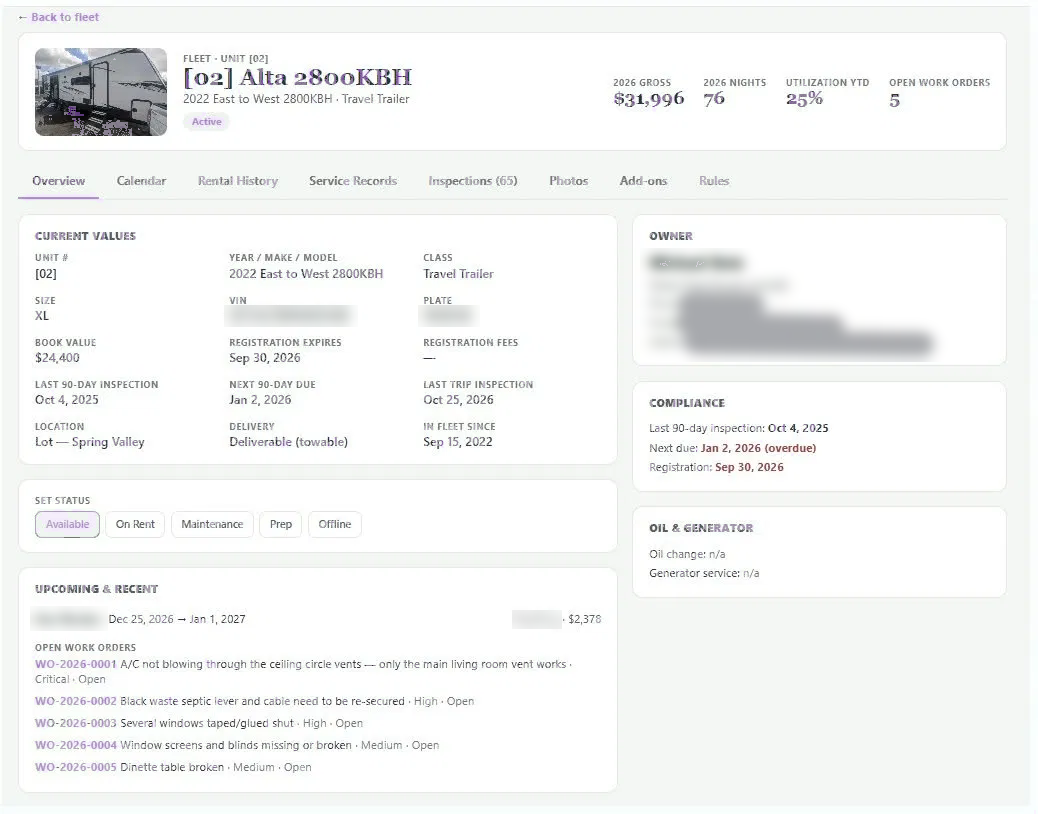
A real source of truth for every property
Property details (access codes, owner, permits, service dates) get scattered across files, texts and memory, and no one’s sure which list is current.
The Property Department holds every property’s record in one place, with live status (active, in shop, prep) and the full profile behind it.
You always know what you have, what’s rentable right now, and what’s tied up — the foundation everything else runs on.
Service & Repair
+ Add New Claim| Maintenance Type | Property | Status |
|---|---|---|
| HVAC service | Property 36 | Scheduled |
| Water heater | Property 51 | Open |
| Brake controller | Property 31 | In progress |
| Turnaround clean | Property 17 | Complete |
| Tire rotation | Property 08 | Complete |
Maintenance, repairs and claims that don’t fall through
A flagged issue gets a text, a verbal "I’ll handle it," and then a property goes out with a problem that should have grounded it.
Service & Repair tracks maintenance, repairs, insurance claims and work orders against the property — with status and the staff assigned to each.
Nothing gets lost between "noticed" and "fixed." Properties come back to the line faster, and you have a clean service history for every asset.
All-in-One Calendar
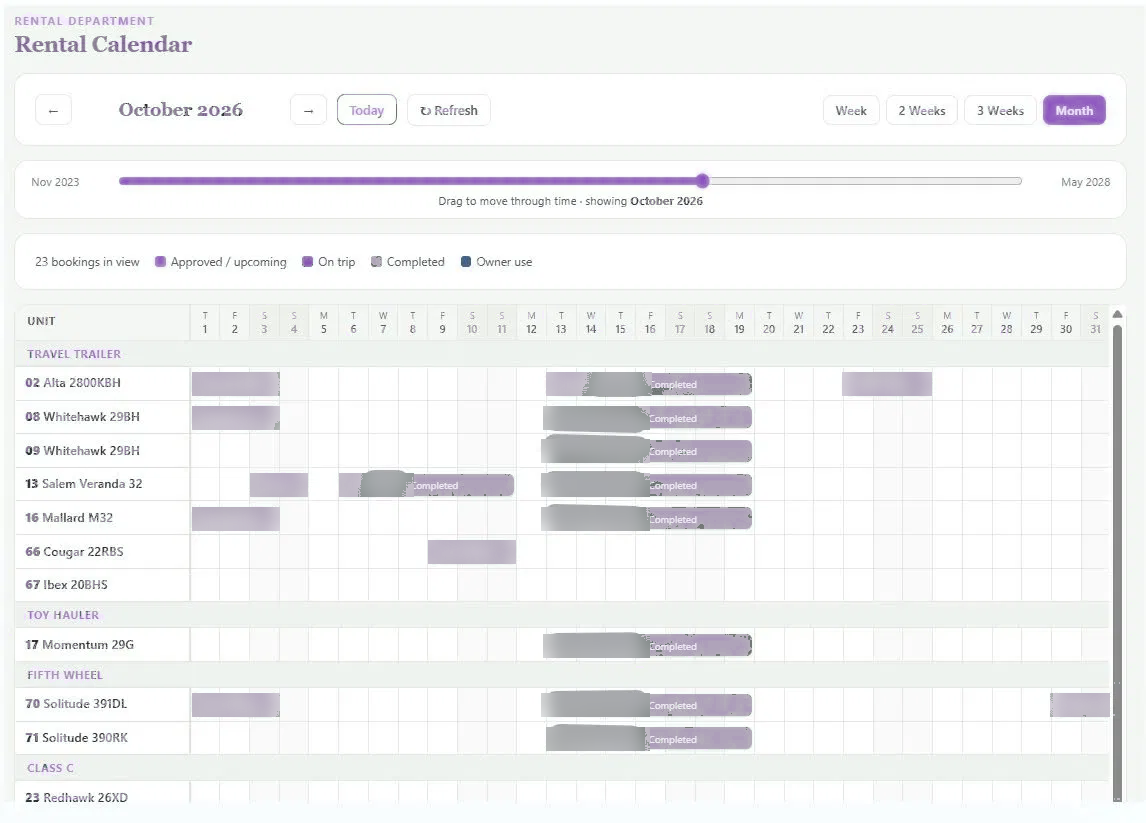
+ Add TaskSee the whole portfolio across time
Knowing whether a property is free for a date means cross-checking bookings, turnovers and maintenance in separate places.
The all-in-one calendar lays every property on a timeline — bookings, availability and blocks — with day, week and month views.
Quote availability with confidence in seconds, spot open gaps to fill, and stop the back-and-forth that loses bookings.
Owners
+ Add Owner| Owner | Properties | Share | Payouts |
|---|---|---|---|
| House portfolio | 11 properties | 100% | Up to date |
| x. xxxxxxx | Property 17 | 50% | Up to date |
| x. xxxxxxx | Property 25 | 50% | Up to date |
| x. xxxxxxxxxxx | Property 27 | 50% | Up to date |
| x. xxxxxxxx | Property 36 | 60% | Up to date |
Property owners who never have to ask
Owner payouts are the most error-prone, trust-sensitive part of a property portfolio — and a wrong number costs you the relationship.
Owners holds each property’s share and generates statements automatically: payout from the nightly rate after processing, by share, with options and taxes itemized and never charged back.
Owners see exactly how every dollar was reached. The monthly "where’s my money" conversation disappears, and owners refer you more properties.
Customers
+ Add New Customer| Full Name | Phone | Source | History |
|---|---|---|---|
| xxxxxxxx xxxxxx | (000) 000-0000 | Direct | 4 stays |
| xxxxxx xxxx | (000) 000-0000 | Direct | 2 stays |
| xxxxx xxxxx | (000) 000-0000 | Marketplace | 1 stay |
| xxxxxx xxxxxx | (000) 000-0000 | Direct | 3 stays |
| xxx xxxxxxxxx | (000) 000-0000 | Direct | 6 stays |
Know who you’re renting to
Repeat guests, contact details and stay history live wherever the last booking happened — so every interaction starts from zero.
Customers keeps every guest’s profile, contact info, source and rental history in one place, linked to their bookings.
Faster repeat bookings, smarter outreach to past guests, and a real picture of who your best customers are.
Accounting
+ New Entry| Entry | Property | Amount | Status |
|---|---|---|---|
| Owner payout — Mar | Property 36 | $685.88 | Posted |
| Platform processing | Property 51 | −$103.25 | Posted |
| Reservation gross | Property 08 | $1,505.00 | Posted |
| Maintenance — HVAC service | Property 36 | −$480.00 | Pending |
| Early check-in | Property 17 | $350.00 | Posted |
The money side, reconciled
Revenue, processing fees, owner payouts and maintenance costs sit in different tools, so the true picture only appears at tax time — painfully.
Accounting posts every entry — reservation gross, processing, payouts, repair costs — against the property, reconciled in one ledger.
You see real per-property profitability and walk into bookkeeping with the numbers already in order.
Inspections
+ Start Inspection| Type | Property | Result |
|---|---|---|
| Pre-stay | SF-08 · Whitehawk | Passed |
| Post-stay | SF-51 · Fuse | Passed |
| Pre-stay | SF-31 · Hurricane | 1 flagged |
| Post-stay | SF-17 · Momentum | Passed |
| Pre-stay | SF-70 · Solitude | In progress |
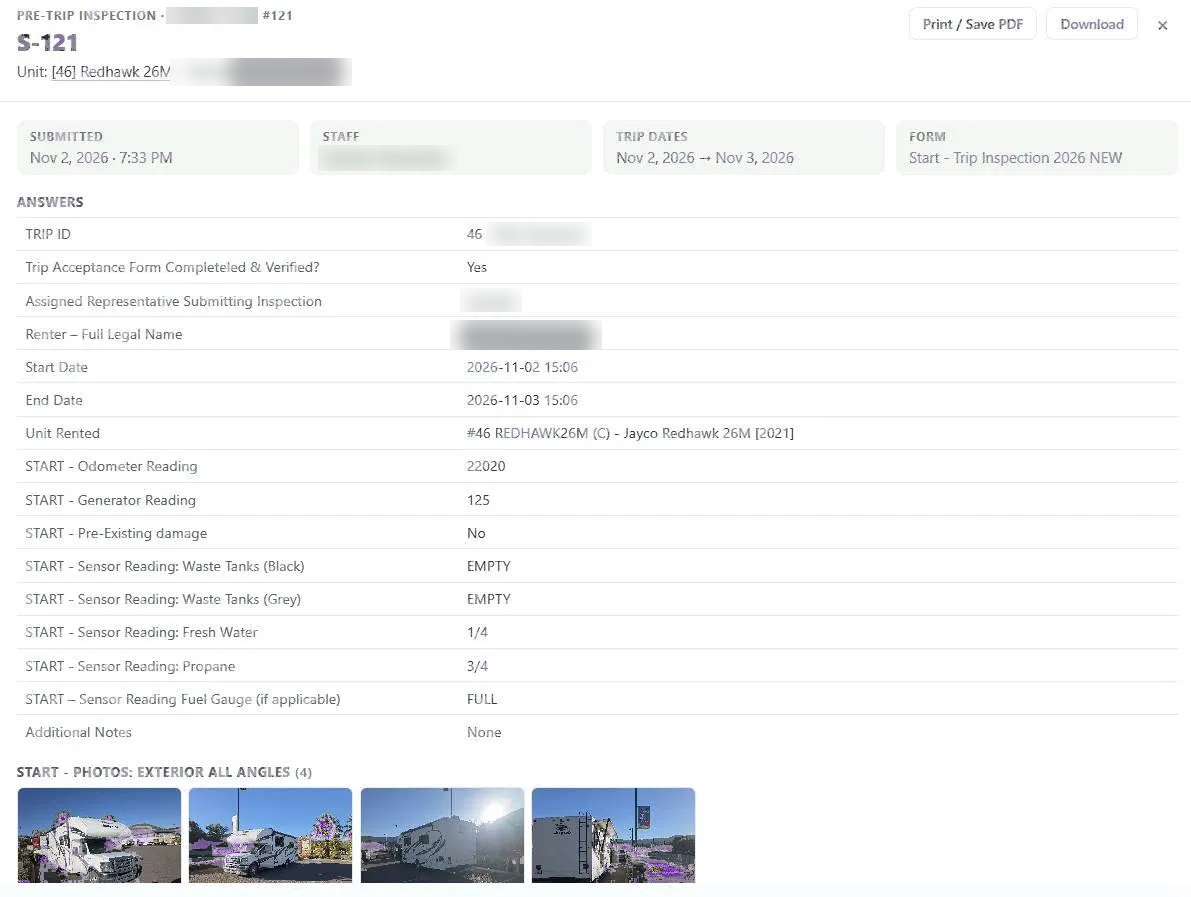
Proof in, proof out
Without a consistent record of condition before and after a stay, damage disputes come down to your word against the guest’s.
Inspections runs pre- and post-stay checklists from any device with photos and notes — and a flagged item becomes a work order in one tap.
Damage gets caught and documented, claims are defensible, and properties get turned around for the next guest faster.
Straight from STVRms in daily use
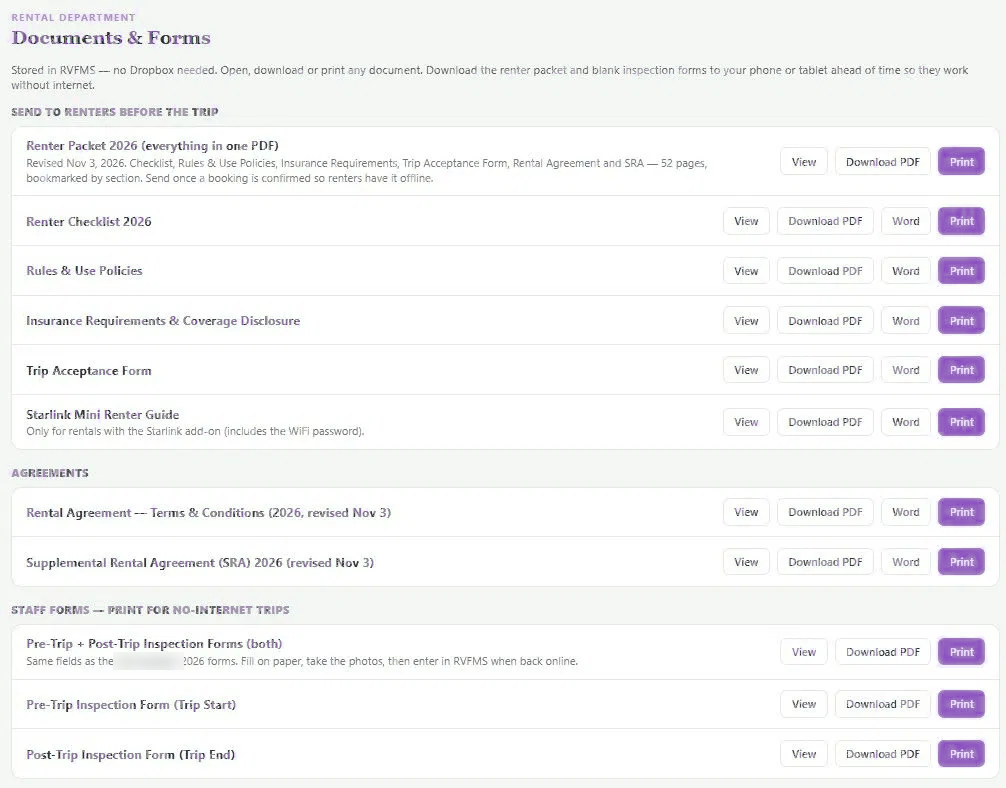
These are screenshots from a working rental portfolio. Names and contact details are blurred.
Everything else a portfolio touches
Deposit and damage tracking
Manage security deposits per booking, with damage claims documented in one place.
Contacts & owners
Owners, guests, staff and vendors — documents, renewals and reminders all on file.
Work orders & shop
Prioritize open work, track time-to-complete, and keep maintenance history per property.
Reports
Utilization, revenue, payout and downtime reporting built around rental metrics.
Alerts & reminders
Registration, insurance and renewal dates surfaced before they lapse.
Location history
Know where every property has been and when across the whole portfolio.
Want to see it on your portfolio?
Book a walkthrough and we'll show you the workflows mapped to how you operate.